CS2 Tradeup Finder
Profitable tradeups you can actually buy
Most CS2 tradeups look profitable until you try to buy the inputs. This Tradeup Finder estimates how many inputs exist at every float, prices every output at its buy order and ranks the best tradeups for your budget.
Why most profitable tradeups only exist on paper
A tradeup only works if you can buy every input at the float it needs. The inputs that make the math work usually sit at the best end of their wear, like a Minimal Wear skin at 0.08.
Those floats rarely sell at base price. Their owners know what they have and list them higher, and for some skins only a handful exist at all. A calculator that prices every input at the cheapest listing of its wear shows you a profit nobody can buy.
This Tradeup Finder starts from the other end: how many inputs can you realistically get at that float?
How the Tradeup Finder finds tradeups you can fill
Before the finder calculates a single tradeup, it estimates which floats of every input you can buy at base price, and how many. Steps 1 to 3 run the same model as the finder, so you can experiment with it right here.
Start with the float drop distribution
Floats don’t drop evenly. Every CS2 skin follows the same drop pattern, measured on its adjusted float ((float − min) ÷ (max − min)). The chart shows that pattern on a full 0.00–1.00 skin, where adjusted float and real float are the same. The gaps in it are floats that never drop and can only be made with trade-ups.
Now switch to 0.00–0.80. The pattern stays the same, but it gets squeezed into the shorter range, so the wear boundaries cut it in different places. Well-Worn drops from 24% of all drops to under 3%. On 0.06–0.80, Factory New almost disappears too.
That’s why the same wear can be common on one skin and rare on another. The finder spreads each input’s trading volume of the last 90 days over its floats in exactly this pattern.
Turn the volume into listings
Then the finder goes through each wear from its best float to its worst and adds up the weekly volume. Every time the total reaches your est. weekly input volume, it places one estimated listing and starts counting again.
Where many items drop, listings sit close together. Where few drop, they spread out, and some floats get none at all. A higher weekly volume keeps only floats you can buy quickly. A lower one finds better floats that take longer to collect.
Example input skin
Sells 70 times a week
Each wear gets one listing for every full sale a week. What’s left over doesn’t make a listing, so the skin has 68 listings across all wears.
| FN | MW | FT | WW | BS | |
|---|---|---|---|---|---|
| Drop share | 3% | 24% | 33% | 24% | 16% |
| Listings | 2 | 16 | 23 | 16 | 11 |
Model low-float scarcity
The best floats of a wear are worth more, and their owners know it. Few of them are listed at base price. So before the listings are placed, the volume is multiplied by the availability curve.
Availability at best float sets where the curve starts: 0.1 means only 1 in 10 of those items is listed at base price. Curve sets how fast availability recovers towards the end of the wear.
Minimal Wear
Floats 0.07–0.15 of the example skin
1 in 10 best-float items is listed at base price
Average availability across the wear: 73%
- Best float you can count on
- 0.08150.0733 from drops alone
- Listings in Minimal Wear
- 1117 from drops alone
* Volume = real float drop distribution × this curve.
Price outputs at buy orders
The estimated listings are priced at base price on your input marketplace. Every possible output is valued at its buy order, the price buyers have already committed to, never at the lowest listing.
EV is the sum of every output’s buy order times its chance. If a tradeup is profitable at buy-order prices, it doesn’t depend on a sale that may never happen.
AWP | LongDog (Factory New)
Train 2025 Collection
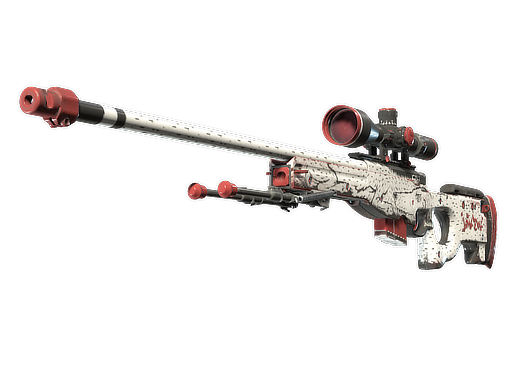
Float
0.069661242857
Buy Order
Listing: 362.83€
Chance
30.00%
- Buy order: 351.95€
- What buyers have already committed to pay. You can sell into it right away, so this is the price the EV uses.
- Listing: 362.83€
- The cheapest asking price. Shown for reference, never used for EV.
- Chance: 30%
- How likely this output is. Its share of the EV is 30% of 351.95€.
EV: 145.84€ − cost: 127.68€ = 18.16€ (14.22%)
Get the top tradeups for your filters
Set your input marketplace, cost range and minimum chance to profit, together with the weekly input volume and availability curve from steps 2 and 3. Then pick how to sort. The finder builds tradeups from the estimated listings and returns the best matches. Work out the details in the Trade-up Calculator.
Sort By
Input marketplace
Est. weekly input volume
Cost
Min. Chance to Profit (%)
Output Rarity
Every number you need to judge a trade up
The Tradeup Finder and the Trade-up Calculator use the same terms. This is what each one means.
- Expected value (EV)
- The probability-weighted value of every possible output, priced at buy orders.
- Cost
- What all inputs cost at the float the tradeup needs, on your input marketplace.
- Return and ROI
- Return is EV minus cost, what the tradeup earns on average. ROI is return divided by cost: 27% means 0.27€ of expected profit per euro you put in.
- Chance to profit
- How likely it is that the output you get is worth more than the inputs cost. EV is the average, this is how often you come out ahead.
- Fill time
- How long collecting every input at the required float should take, based on the estimated availability.
- Adjusted float
- An input’s float normalized to its skin’s float range. CS2 averages these values to set the output float.
Open the Trade-up Calculator to see every possible output of a tradeup with its float, buy order and chance, plus the adjusted target float and the fill time.
Profitable trade ups: questions and answers
Are CS2 tradeups still profitable?
Yes, but rarely the obvious ones. Most contracts return less than the inputs cost. The profitable ones usually depend on inputs at a specific float, and those are hard to buy at base price. That’s why the Tradeup Finder checks availability first: a tradeup is only profitable if you can actually fill it.
How do you find profitable trade ups in CS2?
Compare the expected value of all possible outputs with what the inputs cost at the float you need. By hand, that means checking floats, collections and prices for every input. The Tradeup Finder does it automatically, estimates how many inputs are really available at each float and shows you the top tradeups for your filters.
What makes a tradeup profitable?
Its expected value, the probability-weighted value of every possible output, has to be higher than the total cost of the inputs. Look at the chance to profit as well: two tradeups with the same EV can have very different odds of winning on a single attempt.
Why can’t I buy inputs at the float a tradeup needs?
Two reasons. Some floats are simply rare because far fewer of them drop. And the best floats within a wear, such as Minimal Wear just above 0.07, are often listed above base price because sellers know they’re worth more. The Tradeup Finder models both: drop probabilities for how many exist, and the availability curve for how many are listed at base price.
How is the output float of a tradeup calculated?
CS2 first normalizes each input’s float within its skin’s float range: (float − min) ÷ (max − min). It averages these adjusted floats and maps the average onto the float range of the output skin. That’s why the Trade-up Calculator shows an average adjusted float and an adjusted target float.
Why are outputs priced at buy orders instead of listings?
A buy order is a price someone has already committed to pay, so you can sell into it right away. A listing is only an asking price. Pricing outputs at buy orders keeps the expected value conservative, so the profit you see doesn’t depend on an optimistic sale.
Stop chasing tradeups you can’t fill
Get the best tradeups for your budget and marketplace, based on inputs that actually exist.